Apple
Apple
Small storage? Which SSD should I get?
We test Thunderbolt 5 with some of the fastest drives on the market. Does it really deliver the speeds Apple advertises? And is a Thunderbolt 5 drive worth the investment?
What is Thunderbolt
The latest version of the Thunderbolt protocol, Thunderbolt 5, was first released in 2024 and offered twice the speed (80 Gigabits/sec) than Thunderbolt 4 (40 Gigabits/sec). Thunderbolt 5 is compatible with USB 4 (version 2), but has some differences: although both reach theoretical speeds of up to 80 Gigabits/sec, Thunderbolt 5 allows for higher data rates when connecting to external displays (up to 120 Gigabits/sec) and some advanced features such as PCIe tunneling are mandatory, while USB 4 is not. 4v2 are optional. This makes Thunderbolt 5 devices more reliable for professionals, but also more expensive than USB 4v2 devices.
In practice, Thunderbolt 5 is an easy way to connect high-end devices to yourMac. This is especially useful on modern Macs, as most models don't allow you to upgrade the internal drive or add PCIe cards. Thunderbolt 5 is invaluable for those who need large amounts of storage at speeds that approach or (as we'll see later) exceed the speeds of an internal drive.
Why Thunderbolt 5 and Who Needs It?
Thunderbolt4 with a maximum speed of up to 40Gb/s was already fast enough to meet most needs, such as video editing and backup. So why invest in Thunderbolt5 drives?
The answer is speed and security. Thunderbolt5 drives are so fast that they can easily replace the internal drive of your Mac. This is a big advantage especially on desktop models like the Mac mini and Mac Studio. The internal drive is not upgradeable, and Apple charges a lot of money to upgrade (when ordering the Mac) the internal drive capacity. In contrast, an external Thunderbolt 5 drive is usually much better priced and can run both the operating system and whatever applications you want without seeing any difference in speed.
Leaving your Mac's internal drive unused also helps extend the life of your computer. If the internal drive fails, there is a risk that the Mac will not boot even from a healthy external drive. That's why it's a good idea to avoid damaging the internal drive if you can avoid it. Ifbut you were running the operating system from an external drive at the speeds of Thunderbolt 4 this meant a reduced speed, but with Thunderbolt 5 you will have essentially the same speeds as the internal drive.
The models we test
For the test, we tested the following drive models:
† Note: for the measurements on the boxes m.2 SSD we used the WD Black SN850X M2 SSD PCIe 4.0 NVMe with 2TB capacity
Mac Models.
As a measure of comparison we also measured the speed of the internal drives of the MacBook Pro(M5) which is the latest model of Apple and the Mac mini(M4 Pro) on which all the measurements of the external drives were also made.
For internal drives, Mac use the Apple Fabric technology directly connects the CPU, memory, Secure Enclave, and internal SSD. Apple has not announced the maximum bus speed of the SSD, but third-party tests have shown it to be around 60 Gb/s. In our tests, we saw a big difference in SSD speed between the M4 Pro and the M5, which shows how much Apple has improved the architecture of the M5.
Thunderbolt 5/USB 4v2 Models
| Model | Description |
| Acasis 'TBU501 PRO' Thunderbolt 5 M.2 NVMe SSD Enclosure | External box for m.2 SSD, with built-in fan.† |
| LaCie 'Rugged SSD Pro5' Thunderbolt 5 external SSD / 2TB | External SSD with IP68 and resistance to water, dust, drops up to 3 meters and pressure from a 2-ton vehicle. |
| OWC 'Envoy Ultra' Thunderbolt 5 Portable SSD / 2TB | Shatterproof, dustproof and water-resistant external drive with an IP67 rating. |
| Sonnet 'Echo 13' Thunderbolt 5 SSD Dock + 2TB SSD | This is a Thunderbolt 5 dock/hub that in addition to SSD, also offers a wide range of ports as well as charging up to 140W external device via USB-C. It is primarily intended for use with MacBook. |
Thunderbolt 4 / USB 4 Models
| Model | Description |
| LaCie Rugged SSD4 / 2TB | External SSD with a IP54 rating withstands water, dust and drops. |
| RayCue Hub & Stand & SSD Enclosure for Mac Mini M4 / 40Gbps 4-in-1 | USB hub base with slot for m.2 SSD specifically designed for Mac mini M4†. |
|
Acasis 'TBU405' M.2 NVMe SSD to Thunderbolt 4 Enclosure / Dark Grey
|
External box for m.2 SSD†. |
| Acasis 'TBU405 ProM1' Tool-free M.2 NVMe Thunderbolt 3/4 USB 4 SSD Enclosure with Cooling Fan / Dark Grey | External box for m.2 SSD with built-in fan†. |
USB Models
| Model | Description |
| Samsung 'T7 Shield' Portable SSD 2TB USB 3.2 / Black | External SSD with IP65 dust and water resistance as well as a drop of up to 3 meters. |
| UGreen Docking Station (10 Ports + m2.NVME SSD enclosure) for Mac Mini M4 | Stand USB hub with slot for m.2 SSD specially designed for Mac mini M4†. |
| LaCie Mobile SSD Secure USB-C Drive / 2TB | Portable external SSD drive (USB-C) with AES-256 encryption |
| Satechi Stand & Hub with SSD Enclosure for Mac Mini M4 | Stand USB hub with slot for m.2 SSD specially designed for Mac mini M4†. |
| External Generic SSD USB 3.1 w/ WD Black SN850X 2TB | For comparison, we also included a cheap Chinese external box for m.2 NVMe SSD†. |
| External Generic SSD USB 3.1 w/WD PC SN530 512GB | The same cheap Chinese box for m.2 NVMe SSD, but with a cheaper, slower drive. |
| External 2.5" HDD Toshiba 2TB USB 3.0 | And as a reference for the score, a typical external HDD 2.5" drive. Most users will already have such a drive for backup and data transfer. |
How we measured.
All of our testing was done on a Mac mini with processor M4 Pro with 24GB RAM, 500GB SSD, on macOS Sequoia 15.7.2. To connect the drives we used one of the three Thunderbolt 5 ports with the Apple Thunderbolt 5 Pro Cable (except in cases where the drive had its own built-in cable, such as the OWC Envoy Ultra.)
For the measurements we used two well-known benchmark: the Blackmagic Disk Speed Test, and the AJA System Test Lite. You can find both for free in the App Store. For Blackmagic we chose the 5GB stress test, while for the AJA System Test we chose a 10GB file and codec 16bit RGB. All disks were in APFS format.
Each speed measurement was done three times by each program and the final results in the table are the average of all measurements.
Test results
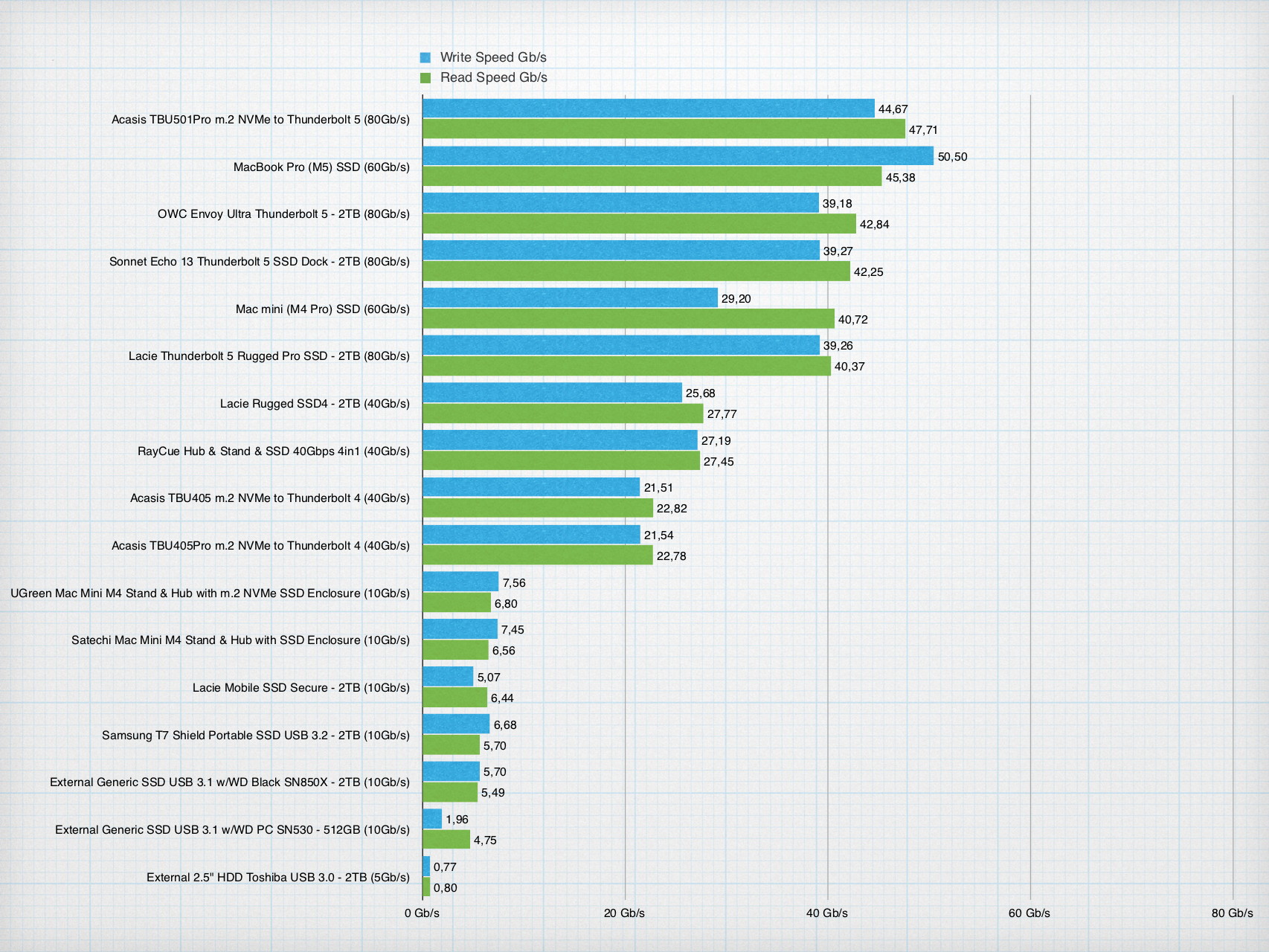
Remarks:
- The actual speeds of Thunderbolt 5 and 4 are approximately half of the maximum. External Thunderbolt SSDs typically reach about 50% of the maximum bandwidth, because Thunderbolt routes the PCIe signal across two lanes (input/output), so data transfer is limited by the performance of the PCIe x4 bus, not Thunderbolt's maximum speed.
- Thunderbolt 5 drives reach speeds that are comparable to internal SSDs of the Mac. This allows for the first time to use external drives for the operating system without any negative impact on speed.
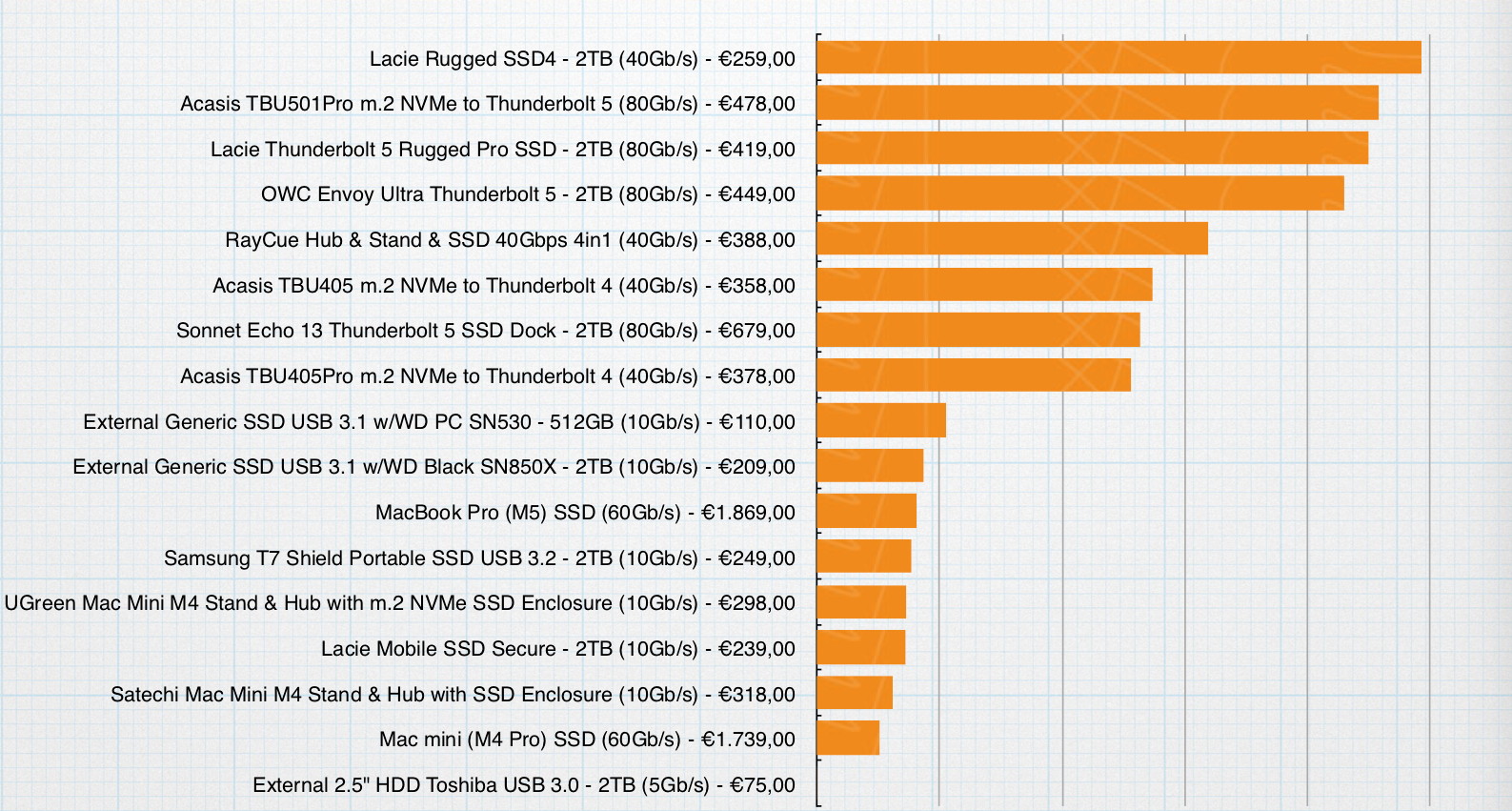
Price/speed ratio.
Here we try to answer a simple question: “Yes, the drive is fast, but is it worth the money?”
The table below shows the price/speed ratio for the test devices. The worst price/speed ratio is used as the basis for the table. Note that only the speed of the drive is taken into account in relation to the price of the device. Other factors (such as whether the device has hub or the capacity of the drive) are not measured. For products that did not have a drive, the prices also include the value of the WD Black SN850X M2 SSD PCIe 4.0 NVMe with 2TB capacity that we used for the test.
* All prices in the table are indicative retail prices including VAT from December 2025.